"When you have eliminated the impossible, whatever remains, however improbable, must be the truth’. A presumption put into the mouth of his fictional detective by Sir Arthur Conan Doyle and illustrating a deductive logic that solved all the many mysteries in his Victorian novels. Sherlock Holmes of course was an artificial creation with an ability that could almost be described as superhuman.
The author, however, had an advantage in this process in that he knew what the answer would be in advance - all he had to do was fill in the investigative details without exposing too many clues along the way. And Holmes himself couldn’t magically absorb all the facts and reach a conclusion without withdrawing to long periods of contemplation with his pipe, a violin and occasional use of drugs. When the final chapter reveals everything to be elementary, the reader and the ever patient Dr Watson is comforted to think that they would have thought of that eventually had they had the time.
The whole point of reading a book from cover to cover is to follow the plot from inception to denouement. If you skip to the last page to find who ‘dunnit’ you will never know the why, the when and the how.
All of those things are in the imagination of the creator and however fantastic, are required to be believable. There is though one flaw in Holmes’ original logic in that it relies on a knowledge of what is possible not what might be. Perhaps it was an age of more certainties than we have nowadays.
The month of November hosted Adobe MAX the annual jamboree to showcase and celebrate all the exciting things to come - at least for all those chosen few enthusiasts in the audience. Most of us on the outside seem to be less impressed although to be fair I’ve only been able to skim the surface of most of the features.
Despite the challenges of the competition, Adobe seems content to press on with more of the same with AI as the solution to pretty much everything at least as far as the headline acts are concerned. There almost seems to be a schizophrenic character involved in that some of the things that are actually useful are downplayed compared to those which are deliberately attention seeking.
It’s a bit like an early Christmas with lots of anticipation and plenty of fancy wrapping. But when all the glitter and tinsel is discarded there are more disappointing presents than any worthwhile gifts. Designers may have a different reception, but as far as digital imaging goes, more than a dozen new gestures could be pruned down to just three that make a difference.
As a Photoshop user from its early days I have a particular perspective as having grown with it I am very conscious that it has grown fat, bloated with features that while valuable, are awkward in operation and very difficult to explain to a less experienced user. This further accelerates the preference to resort to more immediate AI solutions rather than more methodical methods.
In fact Adobe seems intent to further this trend with the use of ‘agents’ like Claude and Chat GTP. At MAX Model Context Protocol or MCP was previewed but how it will work we will know better in the new year when it’s fully operational. Watch this space.
When I got the initial teaser that it was to be the first major update in Photoshop’s workspace in a decade this sounded promising. I mentioned last month it was long overdue.
But much like a well wrapped and much anticipated present it turned out to be a pair of socks. If you have already updated to v28.0 you probably haven’t even noticed they’ve added colour - yes colour - to the tool boxes so instead of imagining what red looks like you get a little visual reference.
Being able to read what a tool is by simply floating the pointer over it instead of just guessing what it does is certainly an improvement, but come on - this isn’t exactly cutting edge as we enter the second quarter of the twenty first century. Spotting the difference between one brush and another shouldn’t be rocket science. Perhaps Adobe is waiting for the time to replace the entire interface with a single text box so you can just type in what you want.
In the meantime, apart from a bit of redecorating, there are five features that claim priority in What’s New, including Prompt to Edit, and Fine Tune images using Generative style. The first explains itself for those who have no idea what to do, the second will produce the sort of unimaginative slop we are all too familiar with from customers.
Adobe is obsessed with the idea of creativity and the theory that all of this AI will relieve the creator of all the menial tasks and allow more time for originality and yet so much of it involves simply copying what has been popular previously. Rather than thinking outside the box, it is often constrained by what is within it. You can’t blame AI for that because we are the ones who supply it with what is possible.
Unfortunately most of the challenges in print on demand involve less creativity and rather more problem solving where the wisdom of AI may be less productive than you might imagine. The product usually arrives pre-cooked and you have to slice through the skin to pick through the bones to make the meal palatable - or at least printable.
The Remove tool has been further refined in the new PS and this is all to the good. The ability, through machine learning, to isolate specific items - whether shape or colour- has been the most significant development in image editing in recent years making changes possible relatively easily compared to previous tedious manual methods. However the traditional approach had one advantage in that it enabled the human eye to supervise the action even if it was pedestrian in process.
Assuming that the machine will do everything correctly simply because it does not have human failings is a fundamental error as any of us who have used a computer over a generation will know. Hence in the working environment a greater reliance on machine intelligence may save time but be more costly if there are mistakes to which the electronic eye is blind. Committing to print is not a decision that can be reversed.
Reversible choices are vital in image editing: actions we call non destructive. And this is where generative AI actions have had limited flexibility - often just a couple of choices take it or leave it and still pay for it. But there are signs there will be big changes in things to come as it seems to be dawning on Adobe that charging extra, in the form of credits, for a product they are already paying a premium for is bad for business.
Almost any image can be improved. Nobody takes a perfect picture, there’s always something that can be done to make it better. The best pictures are often taken in haste, almost by accident rather than those that are well planned which often fall rather flat. Certainly in preparing for print there are things that inevitably need to be done to make it suitable as well as visually satisfying.
One new feature in PS that Adobe makes a big deal out of is Relight which enables you to change the lighting environment of any original, including replacing the actual one and introducing layers with different light sources. This can have some funky results if you like that sort of thing but it will cost you a lot of credits each time you experiment, and the reality is that you can already do a much better job at no extra cost if you know how to use masks. Linear and radial masks have been in PS for years and have been refined in both Lightroom and Camera RAW to produce realistic lighting effects which can be infinitely adjusted.
Lighting is the most basic skill all competent photographers need to learn, but it is also the one most people with camera phones don’t even consider when they grab their device to snap that moment. I’m often asked wha it was like with film, when as some students tell me you didn’t know what was going to come out. I sigh, and try to explain you had to be quite good without sounding too pompous. You saw light - you sensed what film was going to see. You could see where the sun threw shadows, or bleached the colours out of a subject and tuned your lens to allow for it.
Now the user expects to snap away and let the machine sort it out later - and some of the time it does to be fair. But there is one thing that is absolutely deadly to the digital sensor and that is noise. That isn’t an irritating sound in image terms, but a scattering of tiny coloured artifacts in places where no specific colour can be analysed. Not the absence of light as you would have with film, but the absence of substance.
Several software companies have products designed to dial out noise and recently Adobe has had its own formula and it’s very good. But up until now it has only been available for unprocessed RAW camera files. The best kept secret in the 2027 update is that it is now able to treat Jpegs, Tiffs and other pixel files. This really can be described as a game changer for print as the effect is often barely noticed on screen but can be horribly amplified on paper. How well it works on individual files will depend on how bad the effect is on the original, and how much it has been butchered by other apps.
Perhaps it’s one of those things that’s hard to explain to anyone who doesn’t understand. That’s why it doesn’t feature in the marketing hype with the headline grabbers from Adobe MAX but at least printers should appreciate it.
One more specific feature that caught my eye was shadow removal, especially with people and their faces. Harsh shadows, particularly with low winter sun, can be very difficult to remove without destroying facial features beneath. We have already had reflection removal on glasses and windows which can work if sometimes unpredictably. And of course, erasing spots and healing flaws has been a constant process of refinement. The problem as always is that in trying to replace the tedious manual attention to detail with any more automated action generally loses much of the essential detail which makes the image attractive in the first place.
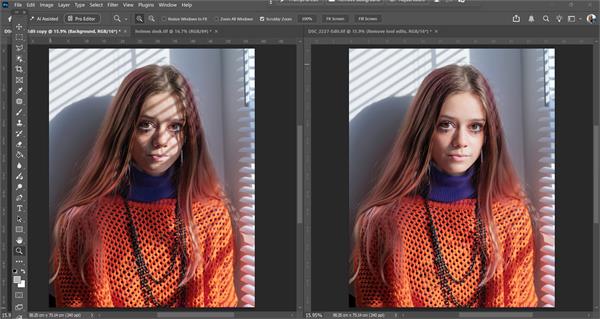 |
At the moment this feature is only available in Photoshop Beta as an addition to the Remove tool, but it works so well it can’t be far ahead of the main programme. I used it on a recent shot I’d messed up trying to be arty with window light through venetian blinds. It was ready for the recycle bin. It needed a little bit of selective help to keep the overall feel of the shot but did a remarkable job of recovering the model’s face without altering a single eyelash. This may not seem like much of a big deal - and even Adobe doesn't seem to say so - but believe me it is. Count the number of times you’ve been asked to ‘do something on the computer’ with something that looked beyond repair.
As the man said it’s all a matter of eliminating the impossible…!